
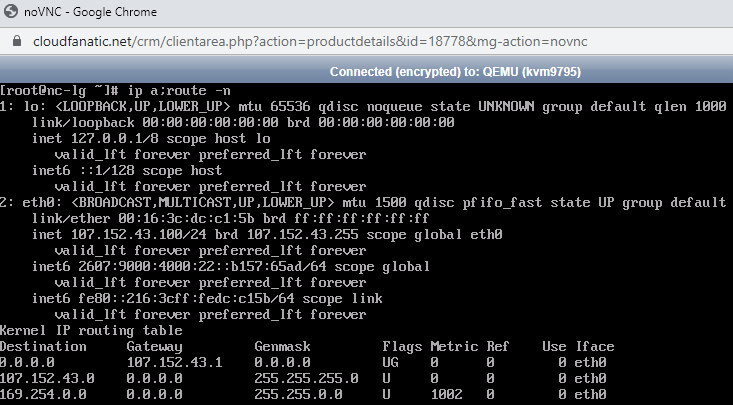
Login to your server as root via the VNC Console:
- Issue the following command: ip a;route -n. The output should be similar to the screenshot above.
- Check and make sure your IP Address (from the output matches the one shown in your dashboard for that server) and netmask are correct. In this example our IP Address is 107.152.43.100 and netmask is always /24 or 255.255.255.0.
- Check and make sure you have the correct gateway setup. The gateway is always your IP Address, except the last octet is always .1. In this example our gateway would be 107.152.43.1.
- You can temporary overwrite the network settings by issuing the following command: ifconfig eth0 inet 107.152.43.100 netmask 255.255.255.0;route add default gw
107.152.43.1
or if the ifconfig command is not available, use the ip command instead:
ip addr add 107.152.43.100/24 dev eth0;ip route add default via 107.152.43.1 dev eth0 - In the above command eth0 is out network interface. Your network interface name is visible from the first command as seen in then screenshot above. If your interface name differs, please change the command according to your name. 107.152.43.100 is our IP address which you have to replace with Your server IP address, 107.152.43.1 is our gateway which you will have to replace with Your gateway.
- Issue the following command:ping 8.8.8.8
- Check your firewall and make sure it is not blocking traffic. If you have previously enabled a firewall, you must disable it to rule it out as a possible cause.
- Do you now get a ping reply ?